← Back to training overview
SharePoint Masterclass

Build, manage, and govern a SharePoint digital workplace your team will actually use

A 2-day, HRDF-claimable masterclass for IT, managers, and power users who need to turn scattered files and ad hoc sites into a practical, trusted Microsoft 365 workspace.

Instructor-led Hands-on labs In-person or virtual HRDF claimable

Participants will learn how to:

  • Structure SharePoint sites, libraries, lists, and permissions.
  • Build landing pages, knowledge hubs, and departmental self-service resources.
  • Use Teams, Planner, Lists, Outlook, and Power Automate as one connected workspace.
  • Automate approvals, notifications, and recurring workflows.
  • Create digital work environments that teams actually use and trust.

Why tacit knowledge matters

In many organisations, critical know-how lives in people’s heads, chats, and email threads. This masterclass helps you capture that tacit knowledge in SharePoint and Microsoft 365, so new staff, remote teams, and leaders can all rely on the same source of truth.

Why this course stands apart

The intranet problem that IT cannot solve alone

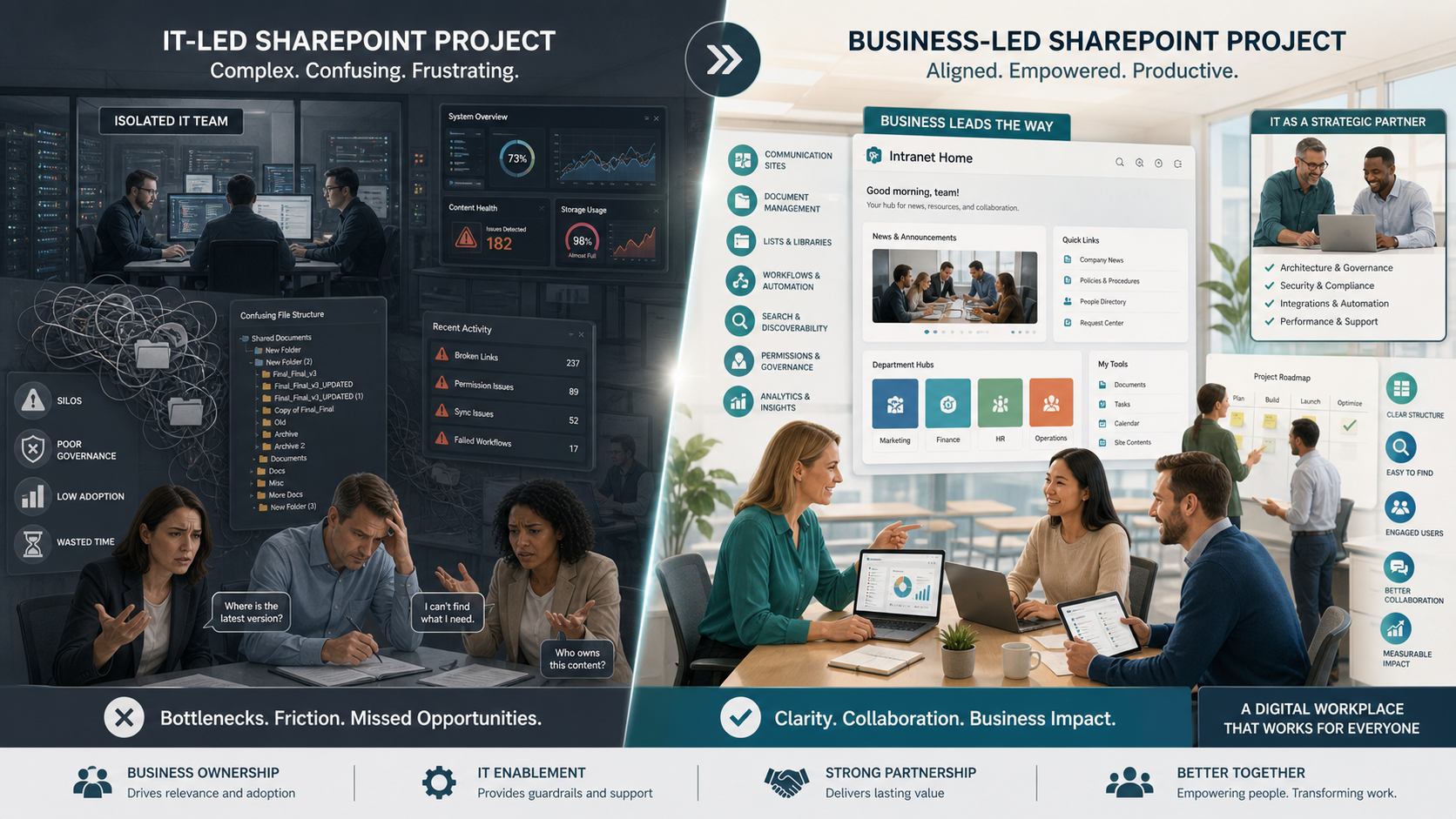
Many SharePoint courses teach features. This one starts with the real operational problem: a digital workplace fails when content ownership sits with IT instead of the business team it serves.

Illustration contrasting IT-led versus business-led SharePoint projects.

The hidden need

  • Does your SharePoint site look more like a dumping ground than a well-structured repository?
  • Are staff still emailing files back and forth because no one trusts the shared workspace?
  • Are approvals, SOPs, and service information scattered across folders, chats, and inboxes?
  • Do remote and hybrid staff miss context because important knowledge only travels informally?
  • Has intranet ownership been handed to IT, even though content belongs to the business?

The distinct advantage

  • This program teaches teams to map real-world work into a digital twin that supports daily operations.
  • Managers and team members learn what content should exist, who it serves, and how it stays current.
  • Participants build a departmental service and content map — not just a set of disconnected pages.
  • The course combines platform configuration with practical workplace design, governance, and adoption.
  • You gain decades of enterprise implementation experience applied directly to your business context.
Intended audience

Who should attend

Designed for the professionals who shape how information flows, how teams collaborate, and how work gets done across departments — not just platform administrators.

IT administrators

Support governance, permissions, and platform structure while enabling business teams to own their content.

Managers and leads

Department managers, HR and operations leads, and internal communications teams who design how information is organised and surfaced.

Power users and champions

Project coordinators and champions who build pages, lists, workflows, and task systems for their teams.

Learning outcomes

What participants will achieve

Every outcome is tied to a real workplace need — from securing access and structuring content, to automating approvals and building a unified Microsoft 365 workspace that supports daily operations.

Key learning outcomes

  • Secure digital workspaces with role-based permissions and access governance.
  • Design information architectures for findability and long-term scalability.
  • Build intuitive navigation, landing pages, and knowledge hubs.
  • Publish targeted news, announcements, FAQs, and departmental resources.
  • Use Planner and Lists for task tracking and team coordination.
  • Standardise recurring processes using reusable templates.
  • Automate workflows and multi-step approvals with Power Automate.
  • Integrate SharePoint, Teams, Outlook, and Microsoft 365 into a unified workspace.
  • Surface critical information within daily workflows so nothing gets missed.

What will be covered

  • SharePoint site architecture and governance models.
  • Permissions, access control, and sharing policies.
  • Document libraries, versioning, and metadata tagging.
  • SharePoint Lists for structured data and tracking.
  • Navigation design and hub site configuration.
  • Home pages, layouts, and web part composition.
  • Knowledge hubs, wikis, and FAQ pages.
  • News, announcements, and audience targeting.
  • Teams structure and channel organisation.
  • Planner for task and project management.
  • Power Automate flows for approvals and notifications.
  • Compliance monitoring, audit logs, and usage reporting.
Program details

Delivery and requirements

Designed for practical application with live facilitation, hands-on configuration labs, and team discussion around real workplace use cases. Suitable for corporate groups and Microsoft 365 adoption initiatives.

Duration2 days
FormatInstructor-led with hands-on labs
Delivery modeIn-person or virtual
Group size10 to 20 participants
PrerequisiteBasic familiarity with Microsoft 365
Participant requirementsLaptop with a Microsoft 365 work or school account
LanguageEnglish, with Bahasa Malaysia available on request
CertificationCertificate of completion
Your facilitator

Rico Ho

Founder of CRN Solutions and HRDF-certified trainer with over three decades in software development and Microsoft collaboration platforms.

Rico Ho is the founder of CRN Solutions Sdn Bhd, a Microsoft ISV Partner, and an HRDF-certified trainer specialising in SharePoint, Teams, and the Power Platform. He has led Microsoft 365 deployments for organisations including Coca-Cola, BMW, Daikin, Heineken, Sunway, and Sime Darby.

He developed Webparts360 — the first Malaysian Microsoft ISV product showcased at Microsoft conferences in the United States and winner of the APICTA Award for Best Applications and Infrastructure Tools. For more than eight years, he has convened Kuala Lumpur's largest independent Microsoft 365 and Power Platform community.

Rico bridges the gap between technical configuration and real-world workplace impact — helping participants build SharePoint environments that people actually use, trust, and rely on.
Next steps

Plan a SharePoint Masterclass for your organisation

Share your team profile, current Microsoft 365 landscape, and the outcomes you need, and we will suggest a SharePoint Masterclass track tuned to your context — including HRDF claim guidance for Malaysian employers.

  • Available for corporate groups and private cohorts.
  • Customisable to align with your use cases and business processes.
  • HRDF claimable for Malaysian organisations.